Workflow Actions are organized into categories to make them easier to find and use. The categories are:
You can access Workflow Actions within the workflow build and then select the add action button.
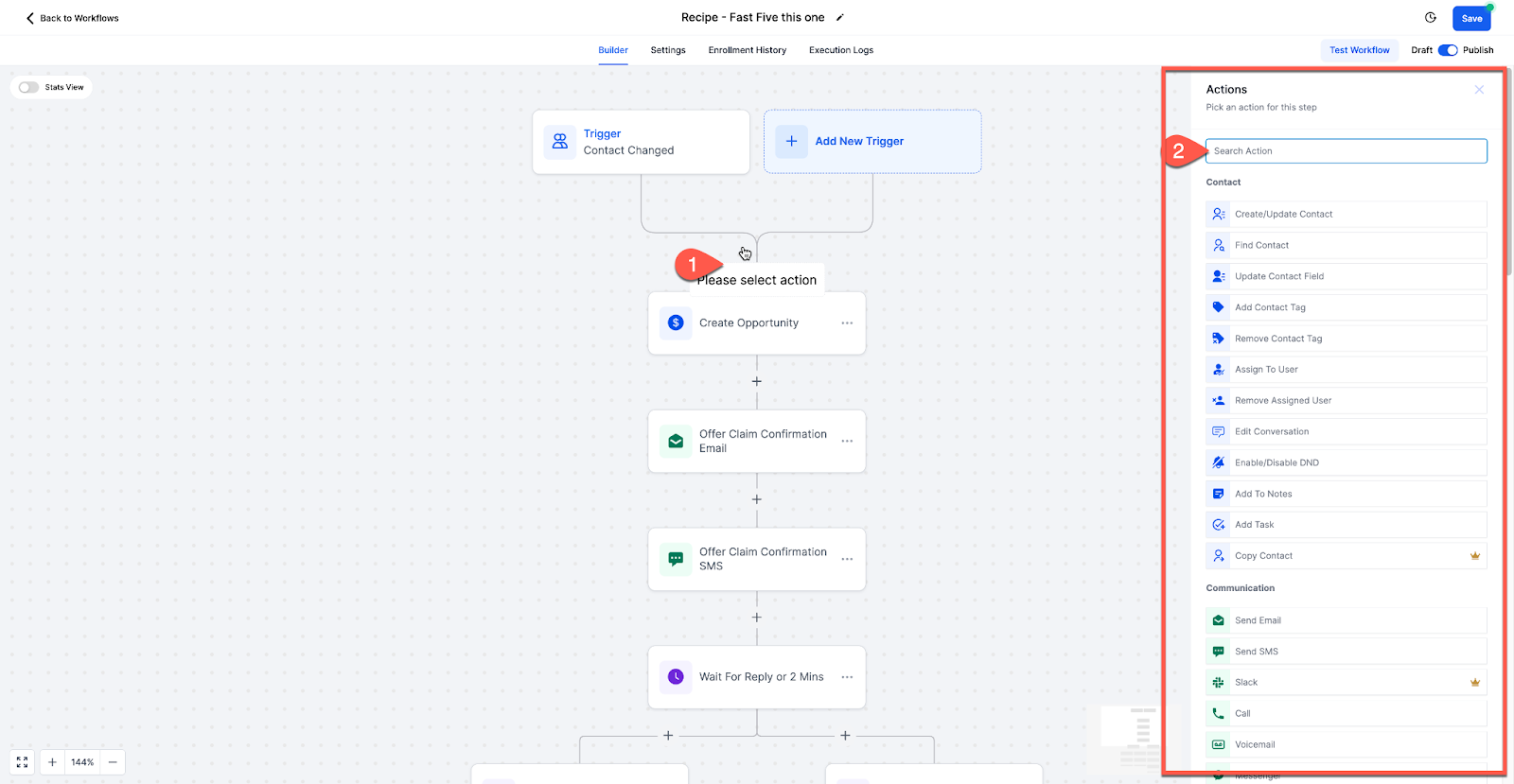
Below we will break down of each action - notating what it does and what it's "useful for" to get you started!
Create Contact:
Adds a new contact to the system, useful for managing new leads.
Useful for: Automates lead capture and organization.
Find Contact:
Locates a contact in the system based on provided data.
Useful for: Helpful for finding existing contacts for updates or referencing.
Update Contact Field:
Modifies a specific field on a contact.
Useful for: Allows for dynamic updating of contact information.
Add Contact Tag:
Adds a tag to a contact for organization and segmentation.
Useful for: Facilitates better contact management and targeting.
Remove Contact Tag:
Removes a tag from a contact.
Useful for: Helps maintain contact list organization and segmentation.
Assign to User:
Assigns a contact to a user in the system.
Useful for: Enables personalized communication and task allocation.
Remove Assigned User:
Removes the assigned user from a contact.
Useful for: Helps in reassigning or managing contacts.
Edit Conversation:
Edits a conversation by marking it, archiving, or unarchiving.
Useful for: Facilitates conversation management within Avantto.
Disable/Enable DND:
Disables or enables "Do Not Disturb" for a contact.
Useful for: Controls outbound communication to manage contact preferences.
Add Note:
Adds a custom note to a contact.
Useful for: Allows for manual tracking of contact interactions.
Add Task:
Creates a task related to a contact.
Useful for: Helps in managing follow-ups and actions.
Copy Contact:
Duplicates a contact into another sub-account.
Useful for: Facilitates data sharing and management across accounts.
Delete Contact:
Removes a contact from the system.
Useful for: Helps in contact list maintenance.
Modify Contact Engagement Score:
Adjusts a contact's engagement score.
Useful for: Assists in evaluating contact interaction and responsiveness.
Add/Remove Contact Followers:
Adds or removes followers to/from a contact.
Useful for: Facilitates shared contact visibility within teams or departments.
Send Email
Sends an email to the contact.
Useful for: Allows personalized communication via email, facilitating follow-ups, updates, and notifications.
Send SMS
Sends an SMS to the contact.
Useful for: Enables direct and immediate communication via text, suitable for alerts, reminders, and quick interactions.
Send Slack Message
Sends a message via Slack if integrated.
Useful for: Facilitates team communication and internal notifications within Slack, streamlining collaboration and task management.
Call
Makes a phone call to the contact, if they pick up, it will attempt to ring a user.
Useful for: Automates lead outreach and management, useful for auto-dialing, and efficiently connecting leads with assigned users.
Messenger
Sends a Facebook message to the contact.
Useful for: Manages inbound messages via Facebook Messenger, enabling personalized communication and customer engagement.
Instagram DM
Sends an Instagram Direct Message.
Useful for: Engages with customers via Instagram Direct Messages, enhancing social media interaction and customer support.
Manual Action
Prompts a manual action to be performed by a user for a contact.
Useful for: Provides flexibility for manual interventions, useful for lead management and personalized interactions.
GMB Messaging
Respond to Google My Business messages.
Useful for: Facilitates customer communication through GMB, enhancing local business engagement and customer service.
Send Internal Notification
Sends notifications to assigned users or contacts.
Useful for: Notifies team members about updates or triggers in the system, aiding in team collaboration and task management.
Send Review Request
Sends a review request.
Useful for: Automates review requests, enhancing reputation management and customer feedback collection.
Conversation AI
Manages inbound conversations with customers.
Useful for: Utilizes AI to handle customer inquiries across multiple channels, improving response time and customer satisfaction.
Facebook Interactive Messenger
Responds to Facebook comments on posts.
Useful for: Engages with customers on Facebook, enhancing social media presence and interaction.
Instagram Interactive Messenger
Responds to Instagram comments on posts.
Useful for: Boosts engagement on Instagram, fostering community interaction and brand awareness.
Reply in Comments
Replies to comments on Facebook or Instagram posts.
Useful for: Facilitates engagement by responding to comments, building relationships with followers.
Sends WhatsApp messages.
Useful for: Enables communication via WhatsApp, adhering to WhatsApp's guidelines for customer support and engagement.
Send Live Chat Message
Responds to live chat messages.
Useful for: Enhances real-time customer support by responding to inquiries via live chat, improving customer satisfaction.
Webhook/Custom Webhook:
Sends data from Avantto to external applications or services.
Useful for: Facilitates integration with other tools and services.
Google Sheets:
Manages data in Google Sheets, enabling updates or lookups.
Useful for: Automates data management and reporting.
If Else
Creates branches based on conditions.
Useful for: Allows personalized customer experiences by directing contacts down specific paths based on conditions, useful for segmentation and customization.
Wait Step
Delays the workflow for a specific time.
Useful for: Useful for scheduling actions or communications at a later time, enhancing workflow efficiency and timing.
Goal Event
Directs contacts to a specific event goal.
Useful for: Helps contacts skip unnecessary steps in a workflow, useful for optimizing customer journeys and automation.
Split
Conducts a split test within a workflow.
Useful for: Allows comparison of different paths or actions, useful for optimizing marketing messages and strategies.
Update Custom Value
Updates custom values.
Useful for: Enables dynamic updating of custom fields based on events or triggers, enhancing data management and personalization.
Go To
Directs contacts to another workflow.
Useful for: Facilitates moving contacts between workflows, useful for managing complex customer journeys without duplication.
Remove from Workflow
Removes contacts from a workflow.
Useful for: Helps manage communication and actions by removing contacts from specific workflows, ensuring targeted interactions.
Arrays
Handles multiple values as a single unit.
Useful for: Simplifies data management and manipulation, allowing sorting, searching, and iteration of data collections.
Drip Mode
Drips contacts through the workflow in batch sizes.
Useful for: Prevents overloading communication channels by controlling the rate at which contacts move through the workflow, maintaining reputation and delivery rates.
Text Formatter
Formats text.
Useful for: Facilitates transformation of text data into a desired format, improving data handling and management.
Custom Code
Executes custom code.
Useful for: Provides advanced capabilities for running custom scripts or programs, allowing complex data processing and automation.
AI Prompt (GPT-3 Powered):
Generates AI responses based on given prompts.
Useful for: Automates AI-driven responses for better engagement.
Update Appointment Status:
Updates appointment status (e.g., rescheduled, no show, completed).
Useful for: Managing appointment statuses and bookings on your calendars.
Generate One Time Booking Link:
Generates a one-time booking link to send to clients.
Useful for: Sending a booking link via SMS or email to protect your calendar from multiple bookings.
Create/Update Opportunity:
Creates or updates an opportunity in the pipeline.
Useful for: Managing opportunity pipelines and moving opportunities along the pipeline.
Remove Opportunity:
Removes the opportunity from specific or multiple pipelines.
Useful for: Managing opportunities by removing them from pipelines.
Stripe One-Time Charge:
Charges a one-time fee via Stripe using the Stripe Customer ID ("cus_id").
Useful for: Sending one-time charges to customers via integrated Stripe.
Send Invoice:
Sends an invoice created in Avantto to the customer.
Useful for: Automating invoice management and sending invoices to customers.
Send Documents and Contracts:
Sends a document or contract from a template to the customer.
Useful for: Automating the process of sending contracts or documents to customers.
Add to Google Analytics:
Adds contact data to Google Analytics.
Useful for: Managing contact data for ads or analytics purposes.
Add to Google AdWords:
Adds contact to Google AdWords.
Useful for: Managing Google AdWords data and running ads.
Add to Custom Audience (Facebook):
Adds contact to a custom audience in Facebook.
Useful for: Managing Facebook ad targeting and audience segmentation.
Remove from Custom Audience (Facebook):
Removes contact from a custom audience in Facebook.
Useful for: Managing Facebook ad targeting and audience segmentation.
Facebook Conversion API:
Sends conversion data to Facebook for better ad tracking.
Useful for: Tracking conversions for Facebook ads.
Add to Affiliate Manager:
Adds a new affiliate to the affiliate manager.
Useful for: Automating affiliate management and adding new affiliates.
Update Affiliate:
Updates existing affiliate details.
Useful for: Managing and updating affiliate information.
Add/Remove from Affiliate Campaign:
Adds or removes affiliate from a specific campaign.
Useful for: Managing affiliate campaigns and promotions.
Course Grant Offer:
Grants a course offer to a contact.
Useful for: Fulfilling purchases of course offers.
Course Revoke Offer:
Revokes a course offer.
Useful for: Managing course offerings.
Gather Input on Call:
Gathers input from callers to determine their path in the IVR.
Useful for: Creating IVR branches based on caller input.
Play Message:
Plays a message within the IVR journey.
Useful for: Providing information or instructions during the IVR experience.
Connect to Call:
Connects the call to a specific user or number.
Useful for: Forwarding calls to the appropriate user or number.
End Call:
Ends the call.
Useful for: Ending the call after a specific action or message.
Record Voicemail:
Records a voicemail from the caller.
Useful for: Allowing callers to leave voicemail messages.
Grant Group Access:
Grants access to a specific community group.
Useful for: Managing access to community groups.
Revoke Group Access:
Removes access from a specific community group.
Useful for: Managing access to community groups.
Workflow actions in Avantto are a powerful way to manage contacts and automate business processes, streamlining tasks such as appointment scheduling, opportunity management, payments, marketing, affiliate management, course offerings, IVR interactions, and community access.